X-Smartermail Spam: nothing happens with custom filters. They are completely ignored.
Problem reported by Brian Bjerring-Jensen - VonBjerring GmbH - Today at 3:55 AM
Submitted
I get this in my inbox.

X-SmarterMail-Spam: DMARC [passed]: 0, Reverse DNS Lookup [Passed]: 0, Null Sender: 0, ISpamAssassin [raw:2,6]: 13, SpamAssassin [raw:-2]: -10, SPF [Pass]: 0, DKIM [Pass]: 0, _ARC: none, SPAMHAUS SBL: 0, UCEProtect Level 1: 0, SPAMHAUS PBL: 0, SPAMRATS ALL: 0, SPAMHAUS XBL: 0, BARRACUDA: 0, SPAMHAUS ZEN: 0, URIBL Black, URIBL Grey, URIBL Red: 0, SURBL: 0, Spamhaus DBL: 0, SEM-URI: 0, DNSBL: 0

I have 4 custom filters that are NOT beeing loaded/user for filtering.

This is the reply-to address: g.harry@arabianinvestmentgroup.loan

I have TLD spam filter with this setting 

Why is all my custom rules beeing ignored in the spam checks??

I am on build 9652.
Gabriele Maoret - SERSIS Replied
I think it's because you entered RegEX rules, which I don't think Smartermail interprets in that option...

If I'm not mistaken, I think you should ONLY enter text matches there...
Gabriele Maoret - Head of SysAdmins and CISO at SERSIS
Currently manages 7 SmarterMail installations (1 in the cloud for SERSIS which provides services to a few hundred third-party email domains + 6 on-premise for customers who prefer to have their mail server in-house)
Its not the only custom rule I have and all are ignored in the spam check on the server.

No matter what I have in there....
Sébastien Riccio Replied
Latest build here. I have custom filters that are based on our incoming gateway added header with scoring, they are still working it seems:


[2026.07.01] 14:01:22.711 [94996066] Spam Check results: [_DMARC: 0,skipped - DMARC Disabled], [_SPF: 0,Pass], [_DKIM: 0,Pass], [_ARC: none], [_CUSTOMRULES: MG-11: 22;]
[2026.07.01] 14:01:25.894 [94996070] Spam Check results: [_DMARC: 0,skipped - DMARC Disabled], [_SPF: 0,Pass], [_DKIM: 0,Pass], [_ARC: none], [_CUSTOMRULES: MG-03: 6;]
[2026.07.01] 14:01:26.066 [94996073] Spam Check results: [_DMARC: 0,skipped - DMARC Disabled], [_SPF: 0,Pass], [_DKIM: 0,Pass], [_ARC: none], [_CUSTOMRULES: MG-07: 14;]
[2026.07.01] 14:01:26.086 [94996071] Spam Check results: [_DMARC: 0,skipped - DMARC Disabled], [_SPF: 0,Pass], [_DKIM: 0,Pass], [_ARC: none], [_CUSTOMRULES: MG-03: 6;]
[2026.07.01] 14:01:28.882 [94996074] Spam Check results: [_DMARC: 0,skipped - DMARC Disabled], [_SPF: 0,Pass], [_DKIM: 0,Pass], [_ARC: none], [_CUSTOMRULES: MG-01: 2;]
[2026.07.01] 14:01:37.877 [94996089] Spam Check results: [_DMARC: 0,skipped - DMARC Disabled], [_SPF: 0,Pass], [_DKIM: 0,Pass], [_ARC: none], [_CUSTOMRULES: MG-01: 2;]
[2026.07.01] 14:01:40.770 [94996091] Spam Check results: [_DMARC: 0,skipped - DMARC Disabled], [_SPF: 0,Pass], [_DKIM: 0,Pass], [_ARC: none], [_CUSTOMRULES: MG-01: 2;]
[2026.07.01] 14:01:52.827 [94996099] Spam Check results: [_DMARC: 0,skipped - DMARC Disabled], [_SPF: 0,Pass], [_DKIM: 0,Pass], [_ARC: none], [_CUSTOMRULES: MG-01: 2;]
[2026.07.01] 14:01:58.815 [94996073] Spam check results: [_DMARC: 0,skipped - DMARC Disabled], [_SPF: 0,Pass], [_DKIM: 0,Pass], [_ARC: none], [_CUSTOMRULES: MG-07: 14;]
[2026.07.01] 14:02:07.876 [94996116] Spam Check results: [_DMARC: 0,skipped - DMARC Disabled], [_SPF: 0,None], [_DKIM: 0,None], [_ARC: none], [_CUSTOMRULES: MG-08: 16;]
[2026.07.01] 14:02:08.048 [94996121] Spam Check results: [_DMARC: 0,skipped - DMARC Disabled], [_SPF: 0,Pass], [_DKIM: 0,Pass], [_ARC: none], [_CUSTOMRULES: MG-01: 2;]

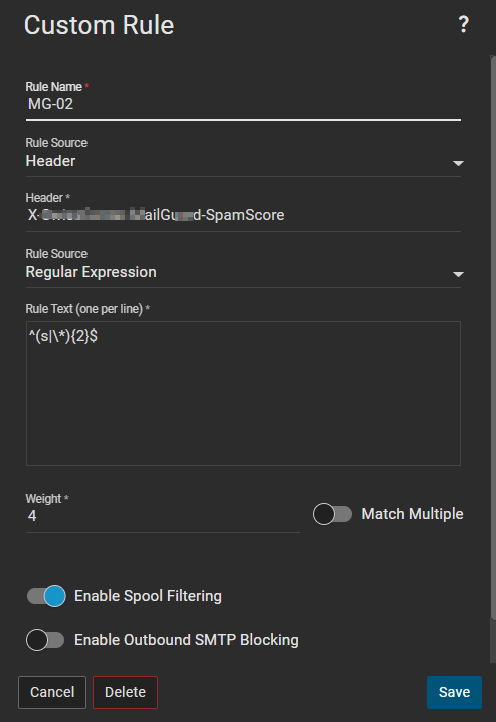
exemple filter:
Sébastien Riccio
System & Network Admin

Gabriele Maoret - SERSIS Replied
@Brian: you ar talking of 2 different type of rules...

You rule is a "CONTAIN" rule, and work only with TEXT MATCHING:


The other's are rules specifically for RegEX:


You need to create this type of rules if you want tho use RegEX...

With the rule you are using you cna only do TEXT MATCHING


Gabriele Maoret - Head of SysAdmins and CISO at SERSIS
Currently manages 7 SmarterMail installations (1 in the cloud for SERSIS which provides services to a few hundred third-party email domains + 6 on-premise for customers who prefer to have their mail server in-house)
Sébastien Riccio Replied
Your patterns seems good, but I see you rule source is "Contains". Shouldn't it be "Regular Expression" ?
Contains doesn't support regex AFAIK.


Sébastien Riccio
System & Network Admin

Sébastien Riccio Replied
Oh Gabriele you were faster :)
Sébastien Riccio
System & Network Admin

Thanks guys. Changed it :) Checking to see if it creates the rules in spamchecks.

Reply to Thread

Enter the verification text